
-
1. Introduction to Data Communication and Networking
-
2. What Is Data Communication?
-
3. What Is Computer Networking?
-
4. Types of Computer Networks
Every time you send a message, attend an online class, watch a video, visit a website, or share a file, information travels between devices through a communication system.
But how does this information travel? How do devices understand each other? And how does information reach the correct destination, even when the sender and receiver are thousands of kilometres apart? Data Communication and Networking (DCN) helps us understand the technologies and principles behind these everyday activities.
Data communication focuses on exchanging information between devices.
Computer networking focuses on connecting devices so they can communicate and share resources. Together, these concepts help us understand how the Internet and modern digital systems work.
You do not need to understand every technical detail before getting started. By learning the concepts step by step, you can build a clear understanding of how networks operate, how devices communicate, and how information travels across the Internet.
How Data Communication and Networking Work
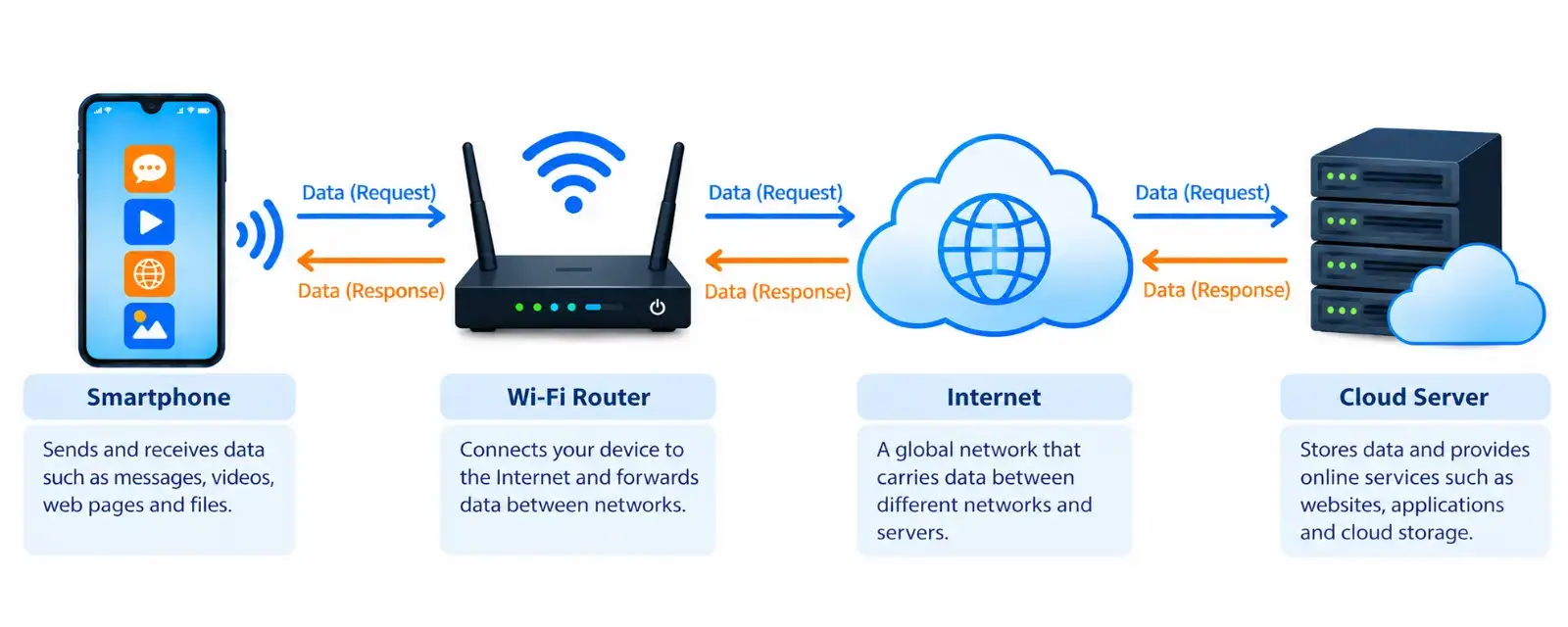
The diagram below shows a simplified example of how a smartphone communicates with an online server through a Wi-Fi router and the Internet. It illustrates two-way communication: the smartphone sends requests and receives responses.
Let’s look at the role of each part.
1. Smartphone — The Device That Sends and Receives Data
A smartphone is an end device that allows users to visit websites, send messages, watch videos, and use online applications.
When you open a website, your smartphone sends a request for information. The server responds by sending the data needed to display the webpage on your screen.
Example: When you open an article on Engisempilot, your device requests the webpage from a web server. Your browser receives and processes the response to display the article.
2. Wi-Fi Router — Connecting Your Device to the Network
A Wi-Fi router helps connect devices on a local network to other networks, including the Internet. It can also provide a wireless connection for devices such as smartphones and laptops.
When your smartphone requests a webpage, the request travels through your Wi-Fi connection to the router. The router then forwards the data towards its destination.
Example: When your smartphone connects to your home Wi-Fi, the router helps it communicate with online services, allowing you to browse websites, watch videos, and use applications.
3. Internet — Connecting Networks Worldwide
The Internet is a global system of interconnected networks that allows devices and servers to exchange data.
Information travelling across the Internet may pass through several routers and networks before reaching its destination. The route depends on how the networks direct the traffic.
The Internet allows people to access online services hosted in different parts of the world.
Example: A student in Bengaluru can access an online learning platform hosted on servers in another country.
4. Web Server — Providing Website Information
A server is a computer system that provides information, applications, or other services to devices that request them. A web server delivers the information needed to display websites.
When a server receives a request, it processes the request and sends an appropriate response. Depending on the service, this may include a webpage, images, or other files.
Example: When you open an article on Engisempilot, a web server sends the information your browser needs to display the article.
5. Data Requests — Information Travelling Towards the Server
The blue arrows labelled Data (Request) show the direction in which a request travels in this simplified diagram.
For example, when you open a webpage, your browser requests the webpage and the resources needed to display it. These requests travel through the network towards the relevant servers.
6. Data Responses — Information Returning to the Device
The orange arrows labelled Data (Response) show the direction in which information returns to the user’s device.
After processing a request, the server sends a response through the network. The browser or application then processes the received information.
A webpage may require several requests and responses before it is fully displayed.
How the Parts Work Together
Each part plays a different role:
- Smartphone: Sends requests and receives information.
- Wi-Fi router: Connects devices to the local network and forwards data towards other networks.
- Internet: Carries data across interconnected networks.
- Web server: Processes requests and provides the requested website information.
Together, these systems make activities such as online learning, video streaming, messaging, cloud storage, and website browsing possible.
Remember: Data communication is the exchange of information between devices, while computer networking provides the connections and technologies that enable devices to communicate.
Why Is Data Communication and Networking Important?
Data communication and networking support many technologies we use every day.
- Education: Online classes, digital learning platforms, and virtual laboratories.
- Business: Communication, file sharing, and access to online applications.
- Healthcare: Connected medical systems and remote consultations.
- Banking: Digital payments and online banking services.
- Entertainment: Video streaming, online gaming, and music platforms.
- Engineering and technology: Cloud computing, cybersecurity, the Internet of Things (IoT), and distributed applications.
For engineering students, DCN provides a foundation for understanding computer systems, network administration, cybersecurity, cloud infrastructure, and other technology fields.
What Will You Learn in This Guide?
This guide takes you from the fundamentals of data communication and networking to the technologies that power today’s connected world.
You will learn how data travels between devices, how different types of networks are organised, what networking devices do, and how communication rules help devices exchange information. You will also explore the OSI and TCP/IP models, IP addressing, routing, TCP and UDP, network security, and modern networking technologies.
Whether you are an engineering student, a beginner exploring computer networks, or a technology enthusiast, this guide will help you build a clear understanding of networking concepts and their real-world applications.
As you progress, you can explore dedicated articles for more detailed explanations, diagrams, examples, and practical exercises.
Data communication is the process of exchanging information between two or more devices through a wired or wireless connection.
The information being exchanged may include text, numbers, images, audio, video, or other digital data.
Devices follow agreed rules called protocols to exchange information and help the receiving device interpret the data correctly.
For example, when you send a message to a friend using a messaging app, your phone sends the message through a network to your friend’s phone. When the message arrives, it appears in the app so your friend can read it.
Five Components of Data Communication
A basic data communication system has five important components. Each plays a role in helping information travel from one device to another.
- Sender: The device that sends the information. For example, your phone is the sender when you send a message to a friend.
- Receiver: The device that receives the information. In this example, your friend’s phone is the receiver.
- Message: The information being sent. It could be a text message, photo, video, or voice recording.
- Transmission medium: The path through which information travels from the sender to the receiver. It could be a physical cable or a wireless connection.
- Protocol: A set of rules that devices follow to exchange information correctly.
Together, these five components help devices exchange information.
What Makes Data Communication Effective?
Sending information from one device to another is not enough. The information should reach the correct destination, arrive accurately, and be delivered at the right time.
For example, a short delay when downloading a document usually does not cause a problem. However, delays during a live video call can make conversation difficult because you may hear the other person late or see their video freeze.
For real-time applications, variations in delay can also affect performance. Understanding these requirements helps explain why different applications need different levels of network performance.
Computer networking is the process of connecting computers and other digital devices so they can exchange information and share resources.
A computer network can connect a few devices in your home, computers in different buildings of a university, or devices in different countries.
For example, when you connect your laptop to your home Wi-Fi, it joins your home network. Your laptop can communicate with other devices on the same network. If your router also as an Internet connection, your laptop can access websites and online services.
How Computer Networking Connects Devices
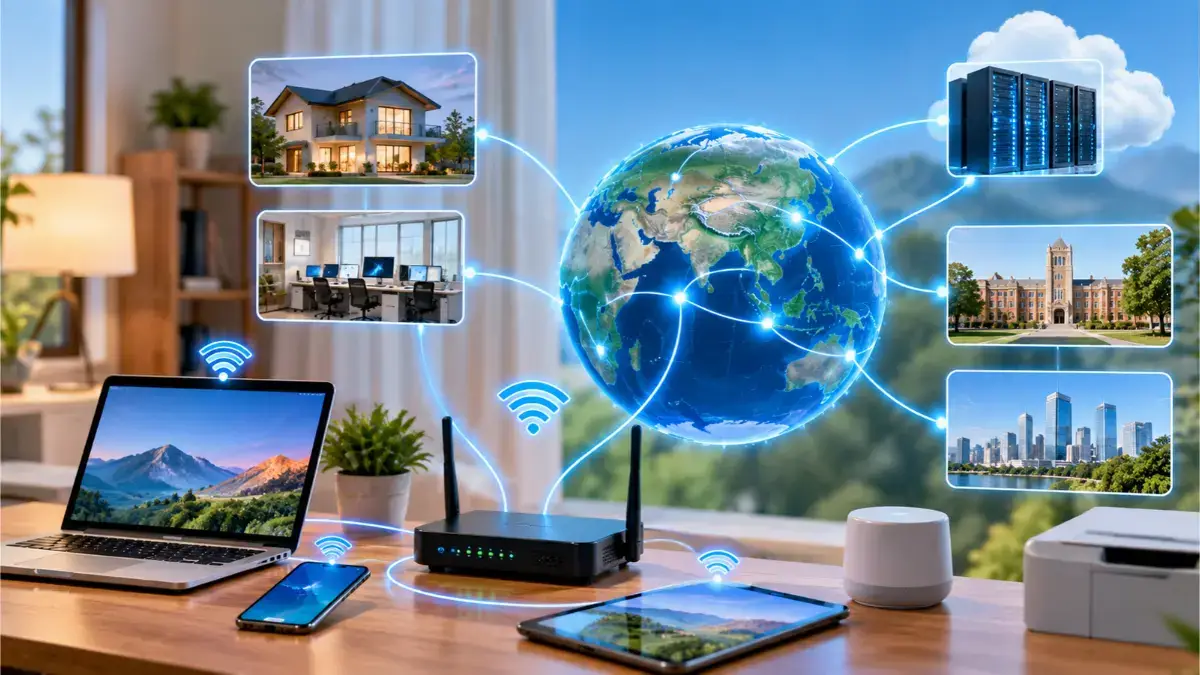
A computer network allows multiple devices to communicate and share information. In a home network, devices such as laptops, smartphones, tablets, and printers can connect to a Wi-Fi router. The router helps manage communication between these devices and, when connected to the Internet, provides access to websites and online services.
Computer networks are not limited to homes. Networks in offices, universities, and organizations can connect many computers and other devices. These networks can also communicate with one another through the Internet, allowing information to travel across cities and countries.
For example, when you open a website on your laptop, your request travels through your local network and router to the Internet. It reaches a web server, which sends the requested information back to your device. This exchange demonstrates how networking enables devices to communicate, access resources, and share information regardless of physical distance.
Computer networks support many everyday activities, including:
- Sharing files and information: Sending documents, photos, and other files between devices.
- Accessing websites and online services: Visiting websites, watching videos, and using online platforms.
- Communicating with others: Sending emails and messages or making video calls.
- Sharing equipment: Allowing multiple computers to use the same network printer.
- Using cloud-based applications: Using online software and accessing files stored on remote systems.
- Managing connected devices: Monitoring and controlling devices connected to a network.
Devices follow a set of rules that helps them exchange information and allows the receiving device to understand the data.
How Are Data Communication and Computer Networking Different?
Data communication is the exchange of information between devices, while computer networking focuses on connecting devices so they can communicate and share resources.
For example, when you send a message to a friend, data communication is the process of transferring that message from your phone to your friend’s phone through a network.
Together, these concepts help us understand how connected devices exchange information.
Computer networks can be grouped in different ways. One common method is to classify them by the geographical area they cover, from connections between personal devices to networks that span large areas.
The following table introduces five common network types.
| Network Type | Full Form | Example |
|---|---|---|
| PAN | Personal Area Network | A smartphone connected to wireless earbuds through Bluetooth. |
| LAN | Local Area Network | Computers connected within a home, office, or school. |
| CAN | Campus Area Network | A network connecting buildings across a university campus. |
| MAN | Metropolitan Area Network | A network connecting locations across a city. |
| WAN | Wide Area Network | A network connecting computers across cities or countries. |
The main differences between these network types relate to the area they cover and how devices connect.
A PAN connects personal gadgets over a short distance, while a LAN links devices within a home, office, or building. A WLAN provides the same local network connection as a LAN but uses wireless technology like Wi-Fi.
A MAN links multiple networks within a city or metropolitan area, whereas a WAN connects networks across large distances, such as between cities or countries.
For example, a campus network connects computers across multiple university buildings, whereas a WAN enables a company to connect its offices in different countries.
These classifications make it easier to understand network coverage areas, but real-world networks may combine different network types.